Premium Quality with Lifetime Warranty

65-Inch TV Wall Mounts (17 products)

Mount a 65-inch TV the right way. Most 65-inch TVs use a VESA 400x400 mounting pattern and weigh between 55 and 80 lbs depending on brand and model. Every TV wall mount in this collection is rated to support that weight range and VESA pattern, so you're not guessing whether it fits.

Choose from three mount types depending on how you use the room:

Full motion mounts let you tilt, swivel, and extend the screen up to 16 inches from the wall. Best choice if your couch is off-center or you watch from multiple seating positions.

Tilting mounts hold the TV flat against the wall and angle down up to 15°. Ideal for mounting above a fireplace or on a high wall where glare is the problem, not viewing angle.

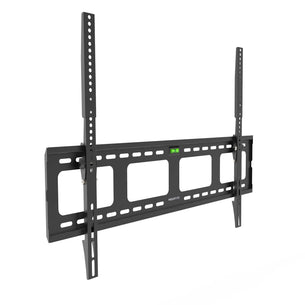
Fixed (flat) mounts sit within 1.5 inches of the wall for a clean, flush look. Best for rooms where the TV is centered at eye level and you don't need to adjust it.

All Mount-It! TV wall mounts for 65-inch TVs include mounting hardware, a bubble level, and installation templates — so you're not making multiple trips to the hardware store. Most install in under 30 minutes with two people and a drill.

Not sure what mount type you need? See our installation guide →
Have a larger TV? See our 75-inch TV mounts →

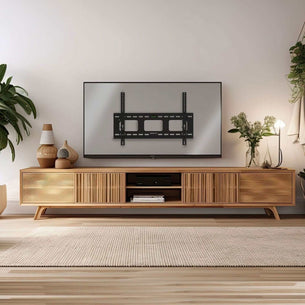
A flat-screen TV is mounted on a wall with a black metal TV bracket visible in the center, above a soundbar and round coffee table in a modern living room.
  • Outline of two open hands positioned upward supporting a shield with a checkmark inside, representing protection, security, or assurance in a simple, minimalistic style with solid blue lines on a transparent background.

    Premium Quality

    All of our products pass through stringent testing development.

  • A black outline of a thumbs-up icon is surrounded by the words “LIFETIME GUARANTEE” in bold blue letters, forming a semicircle above and below the icon.

    Lifetime Warranty

    Warranty covers any defects in material or workmanship under normal use.

  • Blue outline icon of a delivery truck with a large gift box on its back. The word FREE is written on the box, and a bow is on top, indicating free delivery or shipping.

    Free Shipping

    Free ground shipping on all orders within the contiguous United States.

  • Simple blue line drawing of a dollar bill with a curved arrow circling around it, representing money being refunded, returned, or exchanged.

    60-Day Free Returns

    Free returns for a full refund. We cover shipping costs for orders from the contiguous US.

  • An outline of the United States map with the letters USA written in bold, uppercase font in the center. The design is simple with a blue border and no additional details.

    US Based Brand

    American owned and operated. Designed and supported in San Diego.

65-Inch TV Wall Mounts

View as

What to Know Before Buying a 65-Inch TV Mount

Before you order, confirm three things: your TV's VESA pattern, its weight, and the wall type you're mounting into.

  • VESA pattern
    Check the back of your TV or your TV's manual. Most 65-inch TVs — including Samsung, LG, Sony, and TCL models — use VESA 400x400 (mm). Some larger 65" frames use 600x400. All mounts on this page support 400x400 as a minimum. Product specs list the maximum VESA supported, so match that to your TV before adding to cart.
  • Weight
    A 65-inch TV typically weighs 55–80 lbs. Each mount lists its maximum weight capacity. Stay at or below 80% of the rated capacity for long-term stability.
  • Wall type
    Most mounts bolt into wood studs (standard 16" or 24" on center). If you have concrete, brick, or drywall without studs in the right location, see our no-stud TV mounts — they use a different anchoring system rated for the same weight.

Full Motion vs. Tilting vs. Fixed; Which Is Right for a 65-Inch TV?

  • Full motion (articulating)
    The arm extends from the wall and lets you swivel, tilt, and rotate the screen. Useful when the TV needs to face different parts of the room or when you're mounting at an angle. Note: a 65-inch TV on a full motion arm requires studs 16" apart for a stable install. The added weight and leverage of a large screen amplifies any wobble from a poor anchor point.
  • Tilting
    Holds the TV flat and angles it downward, typically 0–15°. Keeps the TV close to the wall (usually within 2–4 inches). Good for high-wall installs where you need to reduce neck strain. Lower cost, easier to install.
  • Fixed (low profile)
    The TV sits 1–2 inches from the wall. No adjustment after install. Best for clean, permanent installs where aesthetics matter and the viewing angle is already correct. Lowest profile, lightest hardware.

Most buyers choosing a 65-inch TV mount choose full motion. The screen is large enough that viewing angle matters more at that size.

Compatible TV Brands for 65-Inch Mounts

Mount-It! 65-inch TV mounts are compatible with all major TV brands that use standard VESA hole patterns, including:

  • Samsung (including The Frame and QLED models)
  • LG (including OLED and NanoCell models)
  • Sony (Bravia X and A series)
  • TCL (5-Series, 6-Series, and QM series)
  • Hisense (U6, U7, and U8 series)
  • Vizio (M-Series, P-Series)

Samsung Frame TV note: The Frame 65" uses VESA 400x400 but has a thinner-than-average back profile. If you're mounting a Samsung Frame, check the mount's minimum arm depth to ensure the cable ports remain accessible after install.

Installation Overview for a 65-Inch TV

A 65-inch TV mount installs in four steps:

  1. Locate studs
    Use a stud finder to mark two studs 16" apart (or 24" if your wall spacing is wider). The wall plate must anchor into both studs for a 65-inch TV. Single-stud installs are not recommended at this screen size.
  2. Mount the wall plate
    Use the included lag bolts to secure the wall plate to studs. Use the included bubble level to confirm it's straight before tightening.
  3. Attach the TV bracket
    Bolt the bracket arms to the VESA holes on the back of your TV. Use the VESA spacers if needed to clear the TV's back panel or ports.
  4. Hang and adjust
    Lift the TV onto the wall plate (two people required at 65 inches). Lock the safety pin. Adjust tilt or swivel to your preferred angle.

Full step-by-step instructions are included with every mount. See our complete TV mounting guide for wall-type-specific tips →

Frequently Asked Questions

What VESA pattern does a 65-inch TV use?

Most 65-inch TVs use a VESA 400x400 mm mounting pattern. Some models use 400x300 or 600x400. Check the back of your TV or the spec sheet in your TV's manual before purchasing. All Mount-It! 65-inch TV mounts support VESA 400x400 as a minimum.

How much weight can a TV mount hold for a 65-inch TV?

A 65-inch TV typically weighs between 55 and 80 lbs. Mount-It! 65-inch TV wall mounts are rated for 77 to 132 lbs depending on the model. Choose a mount with a weight capacity at least 10–20% above your TV's actual weight for long-term stability.

Do I need studs to mount a 65-inch TV?

Yes, in most cases. A 65-inch TV requires anchoring into two wall studs for a secure install. If studs aren't in the right location, use a no-stud TV mount rated for the weight — these use toggle bolt anchors designed for drywall. Do not mount a 65-inch TV into drywall alone with standard anchors.

Can I use a full motion mount with a 65-inch TV?

Yes. Full motion mounts for 65-inch TVs are built with heavier-gauge arms and larger wall plates to handle the additional weight and leverage. Make sure the mount's maximum screen size includes 65 inches and that the weight rating exceeds your TV's weight. Stud anchoring is required.

How far does a full motion mount extend from the wall for a 65-inch TV?

Most Mount-It! full motion mounts extend 4 to 16 inches from the wall depending on the arm configuration. Check the product spec sheet for the specific extension range. For a 65-inch TV, a 6–12 inch extension is typically enough to clear corners or allow comfortable swivel without stressing the arm.

What is the best TV mount for a 65-inch Samsung Frame TV?

The Samsung Frame 65" uses VESA 400x400. A slim or low-profile full motion mount works best because The Frame's thin design benefits from a mount that holds it close to the wall to maintain the "framed art" aesthetic. Make sure the mount does not block the one-connect cable port on the bottom edge of the TV.

Are TV wall mounts universal for 65-inch TVs?

TV wall mounts are not universal, but they are standardized by VESA. Any VESA-compatible mount that supports your TV's hole pattern (400x400 for most 65" TVs) and weight rating will fit — regardless of TV brand. Mount-It! mounts list both VESA compatibility and weight capacity in the product specifications.